
Review: Bigme B7 Pro colour ePaper tablet with 4G
Update 18 Sep 2026: Added Bigme B7 Pro BW review at the bottom

Review unit provided by Bigme
The Bigme B7 Pro is a 7-inch colour ePaper tablet released in December 2025 priced at USD 349.
This is a variant of the Bigme B7 released in June 2025, and as the name suggests this has better specifications. Since the two tablets have many similarities, much of my review below is actually duplicated from the earlier review, with additional writeup on the new features or differences.
Bigme B7 vs B7 Pro
| Model | B7 | B7 Pro |
|---|---|---|
| Price at time of review | USD 299 | USD 349 |
| Screen | 7" Color Eink Screen | 7" Color Eink Screen |
| Color | Dark Blue, Green, White | Dark Blue, Green, White |
| Resolution | BW: 1264*1680 Color: 632*840 |
BW: 1264*1680 Color: 632*840 |
| PPI | BW: 300 PPI Color: 150 PPI |
BW: 300 PPI Color: 150 PPI |
| Device size | 138.6*156.6*5.8mm | 138.6*156.6*5.8mm |
| CPU | MediaTek Helio P35 | MediaTek Dimensity 1080 |
| CPU benchmarks | Octa core 8xA53 AnTuTu Benchmark: 220k |
Octa core 2xA78 6xA55 AnTuTu Benchmark: 720k |
| RAM/ROM | 8+128GB | 8+256GB |
| Expansion | OTG/TF Card Slot (up to 2TB) | OTG/TF Card Slot (up to 2TB) |
| SIM Card | Nano SIM | Nano SIM |
| Call/Message | 4G Global Connectivity | 4G Global Connectivity |
| GPS | Yes | Yes |
| Camera | 5MP | 5MP |
| Reading Light | 36 Level Cold/Warm Front Light | 36 Level Cold/Warm Front Light |
| Touch Button | No | 8 soft keys |
| WIFI/Bluetooth | 2.4G/5G WIFI Bluetooth 5.0 |
2.4G/5G WIFI Bluetooth 5.3 |
| Stylus | Capacitive stylus (Wireless charging) | Capacitive stylus (Wireless charging) |
| Dimensions | 138.6 x 156.6 x 5.8mm | 138.6 x 156.6 x 5.8mm |
| Weight | About 215g | About 215g |
| Battery Capacity | 3000mAh | 3000mAh |
| Mic&Speaker | Yes | Yes |
| Gravity sensor | Yes | Yes |
| Refresh Rate | Up to 30FPS | Up to 43FPS |
| OS | Android 14 | Android 14 |
| Bigme OS5.0 | Yes | Yes |
| AI LLMs | Free | Free |
| Speech to Text | Free | Free |
For the extra USD 50 price difference, the Bigme B7 Pro has more storage, additional 8 softkey shortcuts and better processor.
Things included

- Tablet
- User manual
- Warranty card
- SIM ejector
- One replacement pen tip
- Pen tip remover
- Case
- Pen
- USB-A to USB-C charging cable
No charger is included but you can use any phone charger.

Bigme advertises a "wireless charging stylus" so it seems like this pen may have an internal battery. The pen has a cylindrical design except for a flat side that attaches magnetically to the side of the tablet.
There's an eraser at the back, but no side button.

Pen tip is quite firm, and one replacement pen tip is provided. The pen performance looks like USI pen performance. The pen supports 4096 levels of pressure sensitivity and palm rejection. Writing works fine, but there's noticeable latency. I'll talk more on note taking later.

The flip case is made with PU leather material, and seems well made. The case does not add too much weight to the 215g tablet. The included flip case can hold the pen by the side of the tablet, and there's a flap that goes over the pen to prevent the pen from dislodging.

The stand can be propped up to use the tablet in landscape orientation.
Design

Design of the tablet is clean and simple, and the Bigme B7 and B7 Pro (left) look quite similar. Bigme B7 is available in black and green, while B7 Pro is available in blue, white and green. Bezels for the B7 is black and for the B7 Pro is white.
Display is 7-inch so this is a compact and portable tablet. Weight is just 215g. The tablet together with case don't feel too heavy.

The main visible and functional difference is B7 Pro has eight softkeys for:
- Home
- Task switcher
- Settings
- E-ink center
- Apps
- Control panel
- Page refresh
- Back
Having softkey shortcuts is very convenient. The pen can also be used to press on the softkeys. The physical page-flip buttons are still there.
On some e-ink tablets, I actually prefer the 3-button Android navigation bar at the bottom instead of using swipe gestures.

On the left you can find one speaker and the USB-C charging port. Speaker audio is loud enough but sounds hollow, which is not surprising. Since the USB-C port is by the side, the case has to be opened to charge the tablet.

The card tray can hold one MicroSD card and a nano SIM. Power button's located at the top. There's no fingerprint unlock.
Having 4G cellular support is interesting. Making calls is possible but it's best to use wireless earphones since there's no 3.5mm audio jack for headsets. With cellular support you can also use SMS or install Whatsapp. It's nice to see that even budget tablets can have cellular support.
Display


Resolution of the display is 1264 x 1680 at 300 DPI for BW. Text looks sharp enough but there's some grain when you look close at the e-ink canvas. Shown above is the quality from Default display mode, the Magazine display mode looks better.

Regarding the grain with text, it's normal and expected from coloured e-ink displays. BW only e-ink displays do not have such grain.

The gray of the e-ink canvas is darker compared to just BW e-ink tablets. Enabling the front light will improve contrast noticeably, but the downside is battery life is affected.

The display has a matte textured surface so reflections will be diffused.

There are 36-levels of adjustable brightness for the front light. Lighting looks quite even to me.

Warm light has 36 levels of adjustment too. You can use a combination of cold and warm light, and you can create a preset for your preferred lighting settings.

Eink Center has several display modes that affect visual quality of the colour and refresh time. I did not test all the settings as I just switch between the preprogrammed modes, namely Default, Magazine, Comic and Video. You can create a custom setting too.

Default mode shows slight grain and colours look alright. Refresh is quite responsive. This is the best compromise between visual quality and page refresh responsiveness.

Magazine mode shows cleaner colours with no noticeable grain unless you look real close. Refresh will have page flashing (two times) which can be distracting.

Comic mode increases the saturation and contrast, has noticeable ghosting (image retention) and page flashing.

Video mode has less saturated colours, more grain, faster refresh.

These are extra e-ink settings.

Here's a normal sRGB colour wheel. And shown below is how the colour wheel looks with the default, magazine, comic and video settings.

Default. There seems to be some issues with displaying green. Violets, mauves, mauve pinks, pinks are difficult to differentiate from one another. Lighter red, orange, yellows, yellow greens are difficult to differentiate from one another.

Magazine. Colours are more saturated, but certain colours can be difficult to differentiate from one another due to being similar colour and similar value.

Comics. Colours are more saturated, but colours are easier to differentiate from one another.

Video. Colours almost look like default settings, but on close look there's grain in the colours.

BW comics has slight grain and the black is certainly not as clean as totally BW e-ink tablets.
Performance

The better processor does make the tablet feel more responsive. Apps seem to launch slightly faster, but unless you have the B7 non-Pro by the side to compare, the difference is not signfiicant.
8GB of RAM is alright for multi-tasking.
I would say the better processor is not worth upgrading for, but the 8 softkeys are definitely useful and convenient.
Writing and note taking

The pen supports pressure sensitivity and palm rejection. One downside to the pen is there's no longer any side button.
The pen does not need to be powered on because it seems to be always powered on.

The felt pen tip provides a nice tactile experience when writing on the matte display.
The display is almost laminated, or maybe it is laminated but the display surface has some thickness. Words look like they are on the surface of the display, but if you look at the left or right edges you can see cast shadows.
When I write, trying to position my words between lines but not touching the lines, I find that my words would usually be lower, and touch the lower line.

The default note taking app has quite a number of features and tools.

There's this Global Handwriting feature that is supposed to improve the handwriting latency with third party apps. And I've only tested that with Microsoft OneNote.

When writing with Microsoft OneNote, the lines will appear thin first before the actual style of the line is updated. Bigme has this feature to reduce the latency while writing with third party apps. Without this feature, latency would be even more noticeable.
Battery life
Battery life is around 8 - 10 hours. Battery life will depend on whether you're using the internet and/or the front light.
Conclusion
The Bigme B7 Pro works well as an e-reader. Overall performance is smooth enough, but this is an e-ink tablet so don't expect instantaneous responsiveness from normal Android tablets.
A 7-inch display is better for reading text. Reading comics, PDFs and magazines may not be ideal due to the limited display size, as text size cannot be adjusted.
Google Play Store is included so that allows you to install other ebook apps such as Kindle, Libby, etc.
Downsides. The gray of the e-ink canvas is dark so you'll almost always have to use the front light to compensate for that. Thankfully the battery capacity has increased to compensate for the extra energy use.
The 8 softkeys are useful and convenient. This would be the differentiating factor from the Bigme B7
Battery life is around 8 - 10 hours for me. If you're just reading digital books, then battery life is good. If you are surfing the web, have front light on, all that will affect battery life.
Pros and cons at a glance
+ Beautiful design
+ Solid build quality
+ Comes with case and pen
+ Case has auto wake and sleep
+ Case flap prevents pen from dislodging
+ Lightweight, compact, portable for one-hand usage
+ Reasonable speed for e-ink tablet
+ Colours look alright, but have to adjust settings for best look
+ Has Google Play Store
+ Brightness sliders are easy to use
+ Battery life is good for just reading
+ 8 softkey shortcuts are useful
- Note taking performance is alright, could be better
- Colour e-ink canvas is darker than BW e-ink canvas
- Text has grain due to colour e-ink canvas. Minor issue though.
- 7-inch is not ideal for comics and PDFs
- No fingerprint unlock
- Speaker is loud enough but sounds hollow
Availability
The Bigme B7 Pro is available from the Bigme online store
Bigme B7 Pro BW
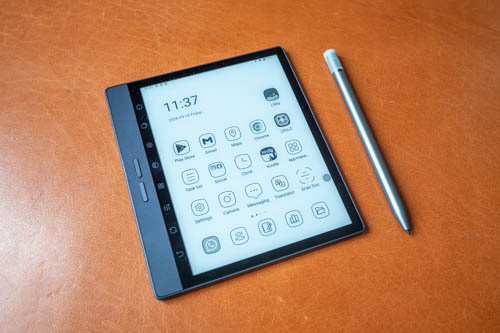
Bigme sent me the BW model months later. It has the same specifications as the Bigme B7 Pro Colour except the display is BW.
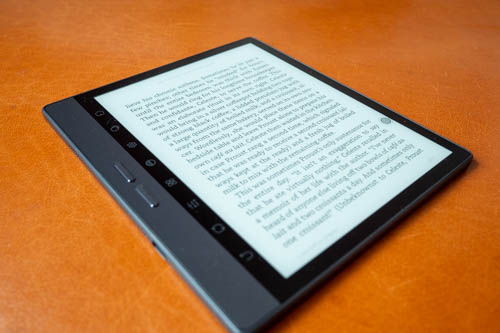
I prefer the BW model because the e-ink canvas is lighter, and hence text and all visuals have better contrast on it.
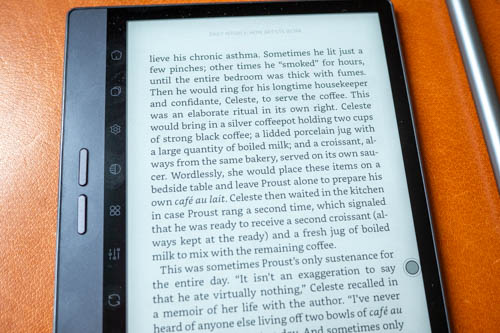
Text quality looks better without the colour e-ink grain.
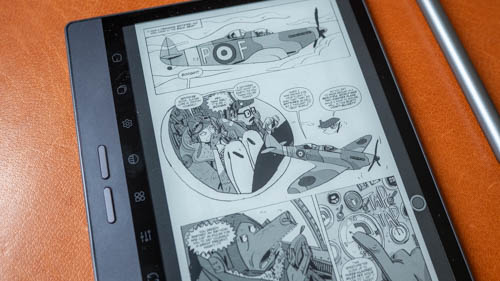
Colour conversion to BW looks good.
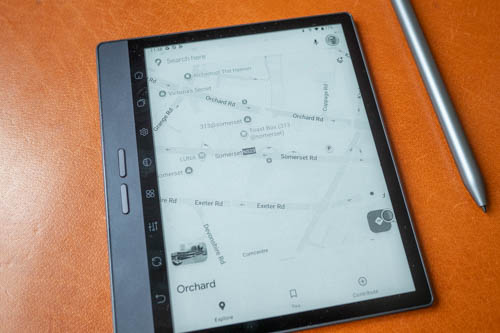
The limitation with the BW model is similar to the colour model, certain colour information will be lost, more so with the BE model. For Google Maps, buildings cannot be seen with default e-ink settings.
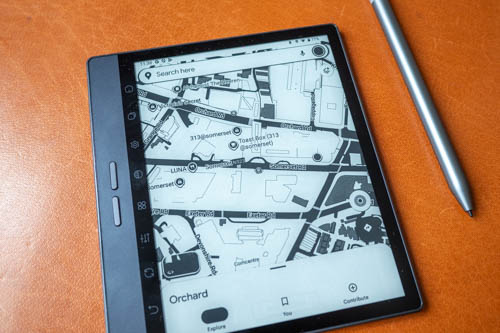
To make certain grays easier to see, you have to use custom e-ink settings and increase the contrast. Doing so for Google Maps makes the roads and buildings easier to see, but the compromise is photos are now almost completely black.



Add new comment